Crowsworn Demo Download Guide: Safe Access and Version Setup
Learn how to access the Crowsworn demo safely, explore its standalone level and steep difficulty, and downpatch to version 1.006 using community depot tools.
Published: Crowsworn Wiki Editorial Team
Table of Contents
How to Access and Download the Crowsworn Demo Safely
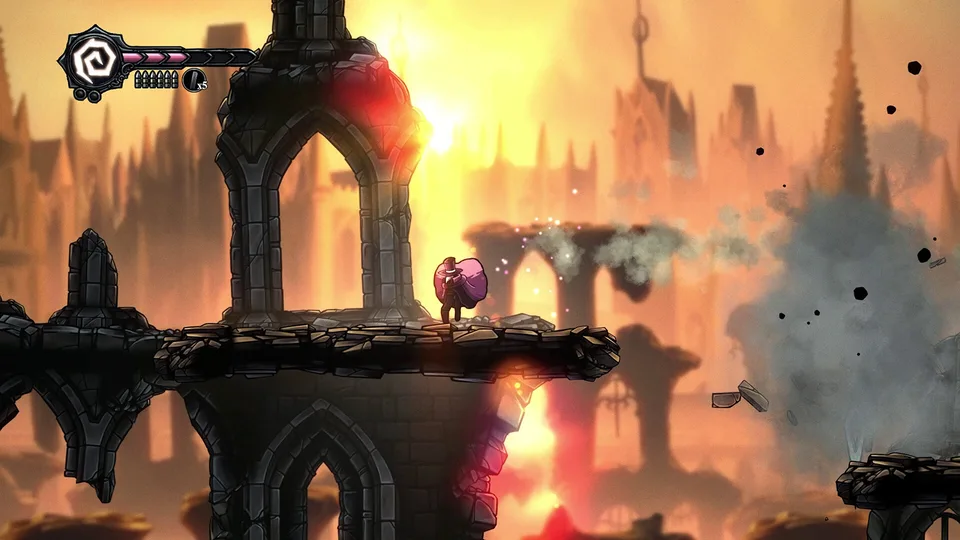
Finding an authentic download for the Crowsworn demo requires navigating developer announcements and official storefronts carefully. Developed by Mongoose Rodeo, Crowsworn is a dark, Victorian-inspired Metroidvania that has generated intense community anticipation. Because hype around the project is elevated, unverified third-party software websites often attempt to attract search traffic by hosting unauthorized repackaged files or adware-laden download stubs.
The legitimate home for Crowsworn on PC is Valve's Steam platform. While the full game's hub is tracked under Steam App ID 1614330, public demo distributions and playtest builds have been offered selectively across development milestones, Kickstarter backer tiers, and seasonal festival events.
If you are looking to obtain the client, prioritize verified ecosystem sources before considering external files.
Warning
Do not download installers from third-party download aggregators. Sites such as Softonic frequently wrap downloads in promotional setup wizards that attempt to install unwanted applications, auxiliary web browsers, or browser hijackers onto your operating system. Always download directly through Steam or verified developer portals.
To verify whether a public demo build is actively claimable right now, follow these steps:
Open your Steam desktop client or visit the official storefront in a web browser.
Look at the right-hand sidebar or the purchase banner area. When an active public demo is live, Steam renders a distinct "Download Crowsworn Demo" button that registers the demo license directly to your Steam library.
If the demo button is not displayed, the public testing window is currently closed between updates. In this scenario, add the game to your Steam Wishlist to receive automated developer dispatches when new trial periods go live.
What Is Included in the Crowsworn Demo vs. the Full Game
A common point of confusion among players seeking the Crowsworn demo download is the difference between the playable preview and the promised scope of the complete release. Community members frequently assume that a Metroidvania demo is simply the opening chapter of the final title. In the case of Crowsworn, developer Mongoose Rodeo took a distinct and intentional design path.
The playable demo drops players into an isolated, standalone environment designed exclusively for testing and feedback. It does not take place in the opening areas of the main campaign, nor does it reveal early-game plot twists.
Standalone Demonstration Level
The demo takes place in a self-contained stage that will not appear in the finished game. This layout lets players experience traversal abilities, platforming gauntlets, and combat pacing without spoiling the lore, geography, or story beats of the kingdom of Fearanndal.
Experimental Difficulty Curve
The demo implements an unorthodox, rapidly escalating difficulty curve. While early encounters introduce fundamental dodge, slash, and ranged gunplay mechanics, deeper sections ramp up enemy damage and hazard density significantly. Mongoose Rodeo implemented this curve deliberately to gather balance telemetry and analyze player adaptability.
Core Combat and Rune Previews
Players can test character customization mechanics, responsive scythe melee strikes, ranged projectile combos, and secret powerups placed throughout the layout. Hidden alcoves reward diligent exploration, giving a tactile preview of how secondary perks alter combat output.
Comparing Demo Capabilities with Full Game Features
To keep expectations grounded, understand that the demo is a mechanics sandbox, while the full commercial release is an expansive campaign. The planned full game features far broader scope, complex character progression systems, and bespoke world design.
Feature / Metric
Crowsworn Playable Demo
Full Commercial Release (Planned)
Setting & Environment
Isolated, custom test level
Interconnected kingdom of Fearanndal
Enemy Diversity
Curated selection of test enemies
More than 120 unique enemy variants
Boss Encounters
Limited preview encounter(s)
Over 30 bespoke boss encounters
Narrative Progression
Zero campaign spoilers
Deep lore, main campaign, and 12+ side quests
Upgrades & Customization
Select movement perks and powerups
Deep skill trees and customizable rune systems
Availability Status
Periodic demo/backer access; patch 1.006
Unreleased (No definitive release date announced)
Installation Footprint
Compact archive (~300 MB for raw depot)
Full-scale Metroidvania asset footprint (TBA)
As shown above, evaluating Crowsworn through its demo gives you an authentic feel for the controls, fluid 2D hand-drawn animations, and atmospheric audio design. However, the demo's extreme difficulty spike was an explicit design choice for early testing rather than a complete representation of the full game's final pacing.
Community Guide: How to Downpatch the Crowsworn Demo to Version 1.006
Within the dedicated Crowsworn speedrunning and challenge community, players frequently seek out earlier revisions of the demo build. Version 1.006 is particularly popular due to specific movement physics, combat timing, and routing behaviors that changed in later updates.
Because Steam automatically updates installed games to the latest build available, community members utilize command-line depot utilities to download the exact historical manifest files from Valve's Content Delivery Network.
Tip
This process requires an authentic Steam account that already possesses access rights to the demo software depots. Depot downloading cannot grant licenses to games or restricted playtests your Steam account does not own.
Prerequisites Before Downpatching
To download and run historical demo files, you will need two utilities installed on your Windows PC:
.NET SDK: The runtime framework required to execute modern C# tools from your local shell. A standard x64 runtime package (roughly 200 MB) installed directly from Microsoft's developer portal is sufficient.
DepotDownloader: A trusted, open-source command-line tool designed to query Valve's SteamPipe servers and pull specific depot manifests using your personal Steam login credentials.
Step-by-Step Downpatching Process
According to player experience and speedrun documentation, following this depot retrieval workflow allows you to extract version 1.006 without overwriting your primary Steam installations.
Install the .NET Framework: Download and run the official .NET SDK installer. Complete the setup wizard to ensure your Windows Command Prompt can recognize the dotnet command.
Extract DepotDownloader: Download the compiled DepotDownloader release archive, extract its contents into an easily accessible directory (such as a folder named DepotDownloader on your Desktop), and open the folder.
Launch Command Prompt in the Tool Directory: Click on the File Explorer address bar inside the DepotDownloader folder, type cmd.exe, and hit Enter. This opens a terminal pre-targeted to your folder path.
Execute the Depot Command: Enter the specific download string tailored to Crowsworn's demo depot and manifest:
Note: Replace <YourSteamUsername> with your actual Steam login handle.
Authenticate with Steam Guard: When prompted in the terminal, enter your Steam password securely. If Steam Guard two-factor authentication is active on your mobile device or email, enter the temporary code to establish a secure handshake with Valve's content servers.
Wait for File Transfer: The utility will connect to the Steam depot servers and stream the required payload (typically around 300 MB). File retrieval takes only a minute or two on typical broadband connections.
Relocate and Run the Standalone Game: Once the terminal indicates the download is finished, navigate inside the newly generated depots subfolder. Locate the build directory containing curse1.exe (or crowsworn.exe). Copy these game files into a new dedicated directory named Crowsworn 1.006.
Launch the Executable: Double-click the main executable directly from your new folder. The window title bar and initial debug screen will confirm the active version as 1.006.
Adding the Standalone Build Back to Your Steam Library
If you wish to retain your Steam Overlay features, custom controller configurations, and screenshot hotkeys while playing version 1.006, you can link the standalone folder directly into your Steam client:
Open Steam and select Games from the top application menu bar.
Click Add a Non-Steam Game to My Library...
Select Browse, navigate to your Crowsworn 1.006 directory, select the game executable, and confirm.
Click Add Selected Programs.
Right-click the newly created library shortcut, choose Properties, and rename it to Crowsworn (Version 1.006) so it remains visually distinct from standard Steam catalog titles.
Safe Download Practices and Avoiding Third-Party Aggregator Pitfalls
Because Crowsworn is one of the most anticipated indie Metroidvanias currently in development, deceptive web portals frequently use misleading titles like "Crowsworn Full PC Free Download" or "Crowsworn Demo Unlocked" to attract clicks. Understanding how these sites operate helps protect your system from malware, rogue browser extensions, and bloatware.
When examining mirror sites like Softonic, several red flags emerge during the acquisition process:
Wrapper Downloaders: Aggregator portals rarely supply direct .zip or uncompressed executable files. Instead, their "Download for Windows" buttons download proprietary web installers (stub loaders).
Bundled Sponsorships: Running third-party stubs often triggers secondary prompts asking you to set an unfamiliar program (such as Ace Browser or third-party optimization suites) as your default operating system software.
Outdated File Listings: Third-party aggregator pages often list arbitrary version dates, platform compatibility tables, and customer ratings that do not reflect developer patches or actual Steam build states.
[ ] Confirm the URL points directly to store.steampowered.com or official Mongoose Rodeo channels before entering login details.
[ ] Avoid any site requiring you to click through promotional sponsor screens or surveys to access an archive.
[ ] Verify that downloaded archives contain legitimate game dependencies rather than generic setup .exe wrappers under 5 MB.
[ ] Run freshly downloaded standalone tools through an updated security scanner or multi-engine platform like VirusTotal before execution.
[ ] Keep separate backup folders for distinct demo builds if you run downpatched versions alongside live Steam files.
Frequently Asked Questions
Does progress from the Crowsworn demo transfer to the full game?
No. Because the Crowsworn demo takes place in an isolated, custom-built test level created to prevent narrative spoilers, save data and unlocked abilities do not carry over to the final campaign. When the full commercial version releases, all players will begin at the start of the story in Fearanndal.
Why is the demo harder than standard Metroidvania titles?
Mongoose Rodeo intentionally designed the demo's difficulty curve to escalate sharply as players venture deeper into the stage. This design served as a development experiment to gather feedback on combat mechanics, test hitboxes, and examine how players adapt to intense encounters under restrictive loadouts.
What platforms can run the Crowsworn demo?
The playable demo builds and depot packages are compiled specifically for Windows PC architectures. While the full game has been announced for PC and major home console platforms, public demo files and speedrun downpatch tools operate exclusively within desktop desktop environments.
What is the official release date for the full Crowsworn game?
As confirmed by developer Mongoose Rodeo, Crowsworn does not yet have an exact official release date. The studio continues active development to polish its interconnected world, ensure combat encounters meet quality standards, and fulfill backer commitments. Keep the title on your Steam Wishlist to track future release date announcements directly from the source.